Bug Report Template: Easy Guide for Issue Tracking
Use our bug report template to create clear, detailed reports that speed up fixes and improve team collaboration. Try it today!

Why Bug Report Templates Transform Development Teams
Imagine a symphony orchestra attempting a performance without a shared musical score. Each musician plays their own interpretation, resulting in a chaotic and dissonant sound. Software development without standardized bug reporting can feel much the same. Inconsistent reports waste valuable developer time, leading to frustration, project delays, and ultimately, a less polished final product. A well-defined bug report template serves as the conductor's score, bringing harmony and efficiency to the development process.
A good template ensures every bug report contains the essential information developers need. This includes vital details like the testing environment, steps to reproduce the bug, the expected versus actual results, and visual evidence, such as screenshots or videos. This clarity eliminates the constant back-and-forth communication between testers and developers, saving significant time and effort.
For example, with a template, a tester can specify the exact browser version and operating system where a bug occurs. This eliminates guesswork for developers, allowing them to immediately replicate the issue and focus on finding a solution. Consequently, bugs are addressed more quickly, leading to faster release cycles and a better user experience.
Benefits of Using Bug Report Templates
Standardized bug report templates provide numerous advantages, directly boosting a development team’s productivity. By establishing a clear structure, they ensure consistency and completeness in every report. This is especially valuable in larger teams or projects involving multiple contributors.
Faster Resolution Times: Clear and concise reports enable developers to understand and fix bugs more efficiently.
Reduced Back-and-Forth: Templates minimize the need for clarifying questions, streamlining communication between testers and developers.
Improved Product Quality: Thorough bug reports facilitate more effective bug fixes, resulting in a higher quality end product.
Easier Prioritization: Standardized information allows teams to triage and prioritize bugs based on their severity and impact.
Enhanced Collaboration: Templates foster improved communication and collaboration amongst testers, developers, and project managers.
This standardized approach is particularly crucial in open-source projects where contributions often come from a diverse and geographically dispersed group. Bug report templates have become increasingly vital in modern software development, offering a standardized format for reporting issues. As of 2024, these templates are recognized as essential tools for improving bug report quality, ensuring thoroughness and clarity, and ultimately, accelerating bug resolution. Learn more about the growing importance of bug tracking templates here. This structured approach allows distributed teams to collaborate effectively, contributing to a more robust and reliable software product.
Moving Towards a Streamlined Process
Bug report templates are more than just documentation; they represent a shift towards a more proactive and efficient development process. They ensure that all team members "speak the same language," facilitating smoother workflows, reducing misunderstandings, and ultimately, leading to a higher quality product. This streamlined process allows teams to focus their energy on what matters most: building and delivering exceptional software.
Essential Elements That Make Bug Reports Actionable
A bug report isn't just a complaint; it's a crucial tool for developers to understand and resolve issues. Each element of the report should contribute to this process. For instance, clear identifiers such as ticket numbers, assigned developers, and relevant features streamline tracking and organization within project management software like Jira. These details help ensure the report quickly gets to the right person.
Providing comprehensive environmental details is also essential. This includes the operating system, browser version, device type, and other relevant software or hardware configurations. This context is crucial for developers to reproduce the bug effectively.
Reproducibility: The Key to Fast Fixes
The most important element of a bug report is a set of clear, reproducible steps. These steps should be detailed enough for anyone to follow and encounter the same bug. Think of it like a recipe: precise instructions yield consistent results. Vague steps can lead to delays and frustration.
Visual evidence, such as screenshots, screen recordings, and annotated images, further clarifies the issue. This is especially valuable for visual bugs. A visual aid allows developers to see the problem directly, eliminating ambiguity and speeding up the resolution process.
Using templates can also streamline your workflow. You can learn more about the benefits of templates in resources like this article on Why Pull Request Templates Transform Development Teams.
Severity and Priority: Guiding the Development Team
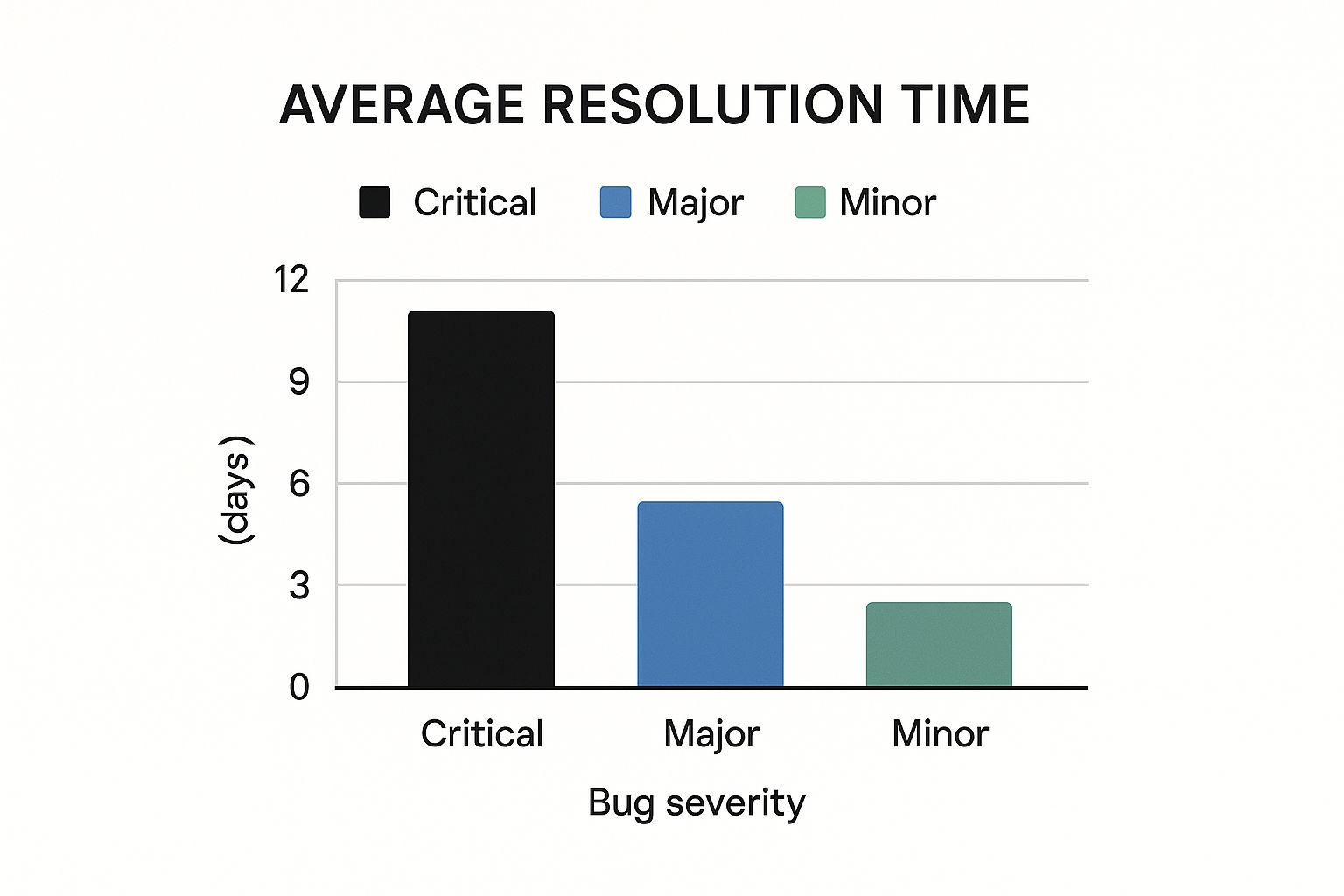
Severity ratings convey the bug's impact on users and business operations. These ratings, often categorized as critical, major, minor, or trivial, help development teams prioritize their work. A critical bug might halt user workflow, while a minor one might be a small cosmetic issue.
Clear priority levels (high, medium, low) indicate the urgency of the fix. A high-priority bug might need an immediate fix, even if it's minor in severity, especially if it impacts a key feature launch. These combined factors help allocate resources effectively and resolve important bugs quickly. For more on effective product development, check out resources like How to master product development best practices.
Visualizing Bug Report Effectiveness
The following data chart visualizes how specific bug report elements impact resolution time, based on data from 500 bug reports.
- Complete Environmental Details: Reduced resolution time by 35%.
- Clear Reproducible Steps: Reduced resolution time by 45%.
- Visual Evidence (Screenshots/Videos): Reduced resolution time by 20%.
As the chart shows, including environmental details, reproducible steps, and visual evidence significantly speeds up bug fixes.
To further improve bug reporting, consider using a structured template. The following table outlines the essential components:
Essential Bug Report Template Components
| Component | Purpose | Best Practice Example | Impact on Resolution Time |
|---|---|---|---|
| Title | Briefly and clearly describe the bug | "Button not working on homepage" | Helps prioritize and categorize bugs |
| Description | Provide more detail about the bug | "The 'Add to Cart' button on the homepage is unresponsive when clicked." | Gives developers more context |
| Steps to Reproduce | List the exact steps to make the bug happen | 1. Go to the homepage. 2. Click the 'Add to Cart' button. 3. Observe no response. | Allows developers to easily reproduce the bug, significantly reducing resolution time |
| Expected Result | Explain what should happen | "The item should be added to the cart and a confirmation message should appear." | Clarifies the intended functionality |
| Actual Result | Explain what actually happens | "Nothing happens when the button is clicked." | Highlights the discrepancy between expected and actual behavior |
| Environment Details | Specify the environment where the bug occurs | OS: Windows 10, Browser: Chrome version 100, Device: Desktop | Helps developers reproduce the bug in the correct environment, saving time |
| Severity | Indicate the impact of the bug | Critical (blocks core functionality) | Aids in prioritizing fixes |
| Priority | Indicate the urgency of the fix | High (needs to be fixed immediately) | Helps developers plan their workload |
| Visual Evidence | Include screenshots or screen recordings | Screenshot of the unresponsive button | Provides clear visual confirmation of the bug, further reducing resolution time |
Using a structured template like this ensures consistency and completeness in bug reports, leading to more efficient bug resolution.
Measuring What Matters: Bug Report Quality Metrics

Simply having a bug report template isn't enough. The reports themselves need to be high-quality to be effective. This means going beyond simply marking a bug as "fixed" or "not fixed" and using more detailed quality metrics. This change in approach helps teams find weaknesses in their reporting process and make specific improvements. These improvements lead to a more efficient development cycle.
Key Metrics for Evaluating Bug Report Quality
Several key metrics can help you assess how effective your bug reports are. Reproducibility is essential. A bug report with a clear reproduction score, perhaps rated on a scale of 1-5, helps measure how easily developers can recreate the problem. This metric highlights how clear and complete the reported steps are.
Another important metric is time-to-understand. This measures how long it takes a developer to understand the core issue described in the bug report. A well-written report should quickly explain the problem, reducing the need for a lot of extra investigation.
Developer feedback loops are also critical. Ask developers for feedback on how clear and actionable the bug reports are. This feedback can identify areas for improvement in the template or reporting procedures.
Finally, resolution efficiency is a key indicator of overall quality. Track the time it takes to resolve bugs, and analyze how report quality relates to resolution speed. This data-driven method offers valuable insights into the effectiveness of your bug reporting process. This leads to a deeper understanding of the importance of well-structured reporting frameworks.
In recent years, data and research have shown how important quality is in bug reporting. Frameworks like CTQRS, which evaluates bug report quality based on several factors, have provided a more structured approach. This framework uses a maximum score of 17 points and considers 75% as the benchmark for high-quality reports. You can learn more about this here.
Implementing Quality Checkpoints Without Bureaucracy
Adding quality metrics doesn't have to mean creating lots of extra paperwork. Simple checklists that focus on key elements can be built into the workflow. These checklists can remind people submitting reports to include all the necessary information, improving report quality right from the start. How to Create and Conduct Net Promoter Score Survey provides a structured way to evaluate the completeness, clarity, and reproducibility of a report.
Peer reviews of bug reports can also be helpful. Having a teammate review a report before it's submitted can catch unclear language or missing information. This collaborative method ensures better quality reports without a significant increase in workload.
The Impact of High-Quality Bug Reports
The ultimate goal of these metrics is to reduce fix times and improve product quality. By focusing on actionable, easy-to-understand bug reports, development teams can fix problems faster. This results in quicker release cycles and a better final product. The advantages of high-quality bug reports benefit the entire development process, creating a positive chain reaction.
Tailoring Bug Templates for Your Project Reality
A one-size-fits-all bug report template rarely works effectively. Just as a product specification requires careful planning (Read also: How to master product specifications), a bug report should be customized to fit the project. Creating an effective bug report template is essential for smooth workflows. Reporting a bug in a mobile app is very different from reporting one in an API. Similarly, the formal processes used by an enterprise team contrast with the more flexible methods of a startup.
Adapting Templates to Different Environments
Each development environment has unique challenges that influence template design. For mobile apps, key elements include the device model, operating system version, and network connectivity. These factors heavily impact how bugs manifest. API issues, on the other hand, require detailed request parameters, response codes, and headers. Without this specific information, developers will struggle to find the source of the problem.
For web applications, browser version, screen resolution, and JavaScript errors are crucial information. Reports for desktop software need to detail the operating system, hardware configuration, and any relevant third-party software. Specialized fields like embedded systems require templates that capture unique data points such as sensor data, firmware versions, and hardware interactions. These tailored details help developers tackle issues efficiently.
Scaling Templates From Startup to Enterprise
Team structure also influences template design. Startups, often working with small, communicative teams, may prefer simpler templates. They value speed and direct communication. As teams and projects grow, more structure is required for efficient bug tracking.
Enterprise teams typically use comprehensive templates, often integrated with Jira or other project management systems. This ensures thorough documentation, consistent language, and streamlined workflows across larger teams. This formality is essential for managing complex projects and maintaining a clear record of reported and resolved issues.
Evolution of a Bug Report Template
A bug report template should evolve alongside the product and team. A simple template may suffice early on, capturing basic information like a description, steps to reproduce the bug, and the expected outcome. As the product grows, adding fields for specific features, modules, or integration points becomes essential.
Imagine a team building an e-commerce platform. Initially, their template might ask for the browser and operating system. As they introduce mobile apps, payment gateways, and international shipping, their template should also change. New fields for mobile device information, payment method, and shipping location become necessary. This continuous adaptation ensures the template's relevance and usefulness.
To further illustrate how bug report templates can be tailored to various project types, consider the following table:
Bug Report Templates by Project Type
Comparison of template elements and priorities across different software development contexts
| Project Type | Critical Template Elements | Optional Elements | Special Considerations |
|---|---|---|---|
| Mobile App | Device, OS version, Network Connectivity | Screen Recording, User Actions | Battery Life, Memory Usage |
| API | Request Parameters, Response Codes | Headers, Error Logs | Authentication Details |
| Web Application | Browser, Screen Resolution, JS Errors | User Agent, Plugins | Network Conditions |
| Desktop Software | OS, Hardware Configuration | Third-party Software | Driver Versions |
| Embedded Systems | Sensor Data, Firmware Version | Hardware Interactions | Power Consumption |
This table highlights how customizing key elements within a bug report template for different project types significantly improves troubleshooting and communication between testers and developers. Adapting templates to specific project needs leads to more effective bug resolution and contributes to higher quality software.
Seamless Integration: Making Templates Part of Your Workflow

A well-crafted bug report template is only effective when properly implemented. Even the most detailed template will fall short if it's not easily accessible and integrated into your team's daily work. This section explores how to seamlessly incorporate templates into your existing development processes, making bug reporting smooth and efficient.
Embedding Templates in Popular Platforms
Many project management and development platforms allow for template integration. Platforms like Jira, GitHub Issues, Azure DevOps, and Trello offer features to embed templates directly into their systems. Jira allows administrators to create custom issue types with pre-populated fields from a template. This eliminates the need for separate documents and streamlines reporting.
GitHub issue templates, added to a repository, guide contributors to provide consistent information when reporting bugs. This standardization helps developers quickly understand and address issues. Azure DevOps and Trello similarly offer features to create template cards or tasks, ensuring consistent data capture across the board.
Automating the Reporting Process
Automation boosts the efficiency of bug reporting. AI-assisted field population can pre-fill certain fields based on the bug's context. For example, a submitted crash report can automatically populate the environment details and error logs within the template. This saves testers valuable time and ensures consistency.
Some tools even convert raw crash reports into structured bug reports based on a defined template. This is especially helpful for complex technical issues. Integrating templates into the CI/CD pipeline can automate the reporting of bugs found during automated testing. This provides immediate visibility into potential problems and accelerates the feedback loop.
Overcoming Resistance to Standardization
Introducing new processes can be challenging. Some team members might resist standardized templates, seeing them as restrictive or adding unnecessary overhead. To address this, involve your team in the template design process. Soliciting feedback and addressing concerns early on fosters buy-in.
Training is key for successful template adoption. Workshops can demonstrate the template's benefits and explain how they enhance workflow efficiency. Clear documentation and readily available support resources will help team members effectively use the templates. Emphasize how standardized reporting reduces ambiguity and improves communication between testers and developers.
Transforming Adoption From Burden to Benefit
Transitioning to a standardized bug report template should not feel like extra work. Frame the change as a benefit. Highlight how it simplifies reporting and reduces time spent answering clarifying questions. Recognize and reward team members who consistently use the template effectively.
By integrating templates seamlessly, providing adequate training, and fostering a supportive environment, template adoption becomes a valued practice. This improved process contributes to faster bug resolution, enhanced product quality, and increased team productivity.
Creating a Culture of Effective Bug Reporting
A well-designed bug report template is only the first step. Even the most comprehensive template can't fix a company culture where reporting bugs feels like a burden. Building a positive culture around bug reporting transforms this essential task into a valued contribution. It moves the perception from a dreaded chore to something that actively improves product quality. This shift requires training, clear communication, and consistent motivation.
Training for Effective Bug Reporting
Successful organizations understand the importance of training. They invest in educating all stakeholders, both technical and non-technical, on how to write a truly helpful bug report. This training shouldn't just focus on filling out a template. It needs to explain why each field matters. When people understand how a well-written report impacts developer efficiency and product quality, the quality of those reports improves dramatically.
For example, a practical workshop can be incredibly effective. Walking participants through a real-world bug example demonstrates how missing information can introduce ambiguity and delay resolution. Hands-on exercises, where attendees write and review sample bug reports, reinforce the training. This builds confidence and provides practical experience. Applicant tracking systems can be helpful for streamlining this entire process, ensuring smooth integration and efficient tracking.
Motivation and Recognition
Training alone won’t transform bug reporting into a positive activity. Recognizing and rewarding individuals for submitting high-quality reports is essential. This boosts morale and encourages more thorough reporting. Recognition can be simple: a quick acknowledgment in team meetings, small rewards, or even incorporating report quality into performance reviews.
Creating a feedback loop is also important. When developers acknowledge and thank reporters for helpful submissions, it reinforces the value of their contributions. This positive reinforcement encourages more careful reporting and strengthens the relationship between those who find bugs and those who fix them. Check out this helpful resource: How to master responding to product negative feedback.
Fostering Communication and Collaboration
Remember, effective bug reporting isn’t a one-way process. Open communication between reporters and developers is critical. Developers should provide feedback on the reports they receive, explaining what was particularly helpful and what could be improved. This feedback loop helps reporters understand the impact of their work and refine their reporting skills.
Peer review systems are another valuable tool. Having team members review each other's bug reports before submission can drastically improve the quality of reports. It fosters a shared sense of responsibility for product quality. This collaborative approach helps identify any missing information or unclear language before the report reaches the development team.
By building a culture that values clear communication, provides comprehensive training, and recognizes individual contributions, organizations can transform bug reporting from a burden into a powerful asset. This strong reporting culture, combined with a well-designed template, empowers teams to quickly identify and resolve issues, leading to a better product and a happier user experience. Ready to improve your product development? Saylo centralizes user feedback, roadmapping, and communication, empowering your team to build better products, faster.